
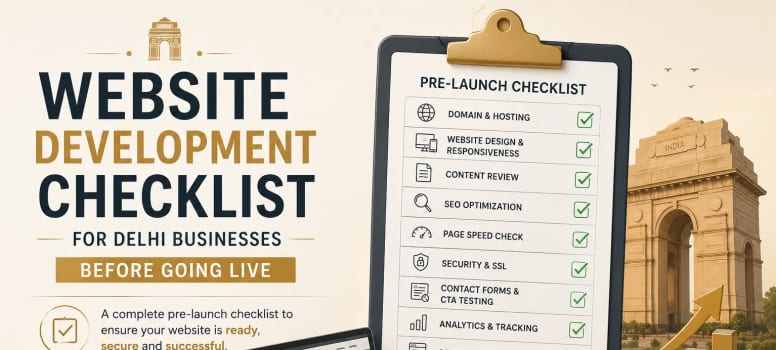
A website should be completely tested before it goes live. For Delhi businesses, launching a site is not just about making the design look attractive. The website should work properly on mobile and desktop, load quickly, provide clear information, generate enquiries, and be accessible to search engines. A final checklist helps identify small problems before they affect real visitors.
Whether you build the website yourself or hire a Website development company in delhi, reviewing every important element before launch can save time and prevent costly fixes later.
Start With a Complete Page Review
Before publishing the website, open every important page and review it as a real visitor would. Check the homepage, service pages, about page, contact page, blog, landing pages, and any other pages included in the navigation.
Look for incomplete sections, placeholder text, missing images, incorrect information, and inconsistent formatting. Every page should have a clear purpose and should guide visitors naturally toward the next step.
Navigation also deserves a complete review. Visitors should be able to reach important pages without repeatedly going back to the homepage.
Check:
Main navigation and dropdown menus
Footer links
Internal links
CTA buttons
Contact links
404 and redirected pages
Make Sure the Website Works on Mobile
A website that works well on desktop may still have usability problems on smartphones. Before launch, test the website on different screen sizes and check how the layout changes.
Text should remain easy to read, images should fit the screen, and buttons should be comfortable to tap. Menus should open correctly without covering important content.
Forms are particularly important on mobile. Users should be able to complete them without excessive scrolling or accidentally clicking the wrong field.
For Delhi businesses, this matters because potential customers may discover a service through their phone while travelling, comparing businesses, or looking for a nearby provider.
Check Website Speed and Performance
Website speed should be checked before launch rather than after visitors begin complaining about slow pages. Large images, unnecessary scripts, excessive plugins, and poorly optimized resources can all affect performance.
Compress images and use appropriate formats without reducing their quality unnecessarily. Remove resources that are not being used and review third-party scripts that may slow down the page.
Tools such as Google PageSpeed Insights and Lighthouse can help identify performance problems. Look beyond the overall score and understand which elements are creating delays or poor user experience.
A fast website makes it easier for visitors to explore your services and complete important actions.
Review Your Website Content
Content should be checked carefully before the website becomes public. Read every page and ask whether a new visitor can understand what the business does without needing additional explanation.
Your service descriptions should be specific and useful. Avoid generic statements that could apply to almost any business. Explain what you offer, who you serve, and what makes your services relevant to customers.
Also check basic details such as phone numbers, email addresses, business information, service areas, and calls to action.
Before launch, confirm:
No placeholder content remains
Headings are properly structured
Images match the surrounding content
Grammar and spelling are correct
Contact information is accurate
CTAs clearly explain the next step
Review SEO Elements Before Publishing
SEO should be included in the pre-launch process. Each important page should have a clear topic, useful content, and an appropriate page title.
Review title tags and meta descriptions so they accurately describe the page. Check that URLs are short, readable, and related to the page topic. Images should also have descriptive alt text when it provides useful context.
Avoid creating several pages that target the same search intent without a clear reason. A well-organized website helps both visitors and search engines understand the relationship between different pages.
Check Technical SEO Settings
Technical settings can easily be overlooked during development. A website may look completely finished while important search engine settings are still incorrect.
Check the robots.txt file to make sure important pages are not blocked accidentally. Review the XML sitemap and confirm that it contains the pages you want search engines to discover.
Canonical tags should also be reviewed where applicable. If the website has moved from an old version, check that it redirects point visitors and search engines to the correct URLs.
Important technical checks include:
XML sitemap
Robots.txt
Canonical tags
HTTPS
301 redirects
Indexing settings
404 page
Preferred URL version
Test Every Contact Form and CTA
The main purpose of many business websites is to generate enquiries. A beautifully designed website is of little value if its contact form does not send messages correctly.
Submit test enquiries from both desktop and mobile devices. Confirm that emails reach the correct inbox and that users receive an appropriate confirmation message.
Test phone numbers, WhatsApp buttons, appointment links, quotation forms, and other conversion elements. Every important CTA should perform the action it promises.
This is particularly important for service businesses because a technical problem with an enquiry form can result in lost leads without the business immediately realizing it.
Connect Analytics and Search Tools
Tracking should be ready when the website launches. This allows you to understand how users find the website and what they do after arriving.
Set up Google Analytics and Google Search Console where appropriate. If Google Tag Manager is being used, test tags and triggers before relying on the collected data.
Make sure important actions are tracked correctly. For example, form submissions, important button clicks, or other conversion actions may need to be measured separately.
The goal is to avoid launching a website and then discovering weeks later that important visitor data was never recorded.
Check Security Before Going Live
Security should be reviewed before the website becomes publicly accessible. Make sure HTTPS is working correctly and that there are no insecure resources being loaded on important pages.
If the website uses WordPress or another CMS, update the core software, themes, and plugins before launch. Remove anything unnecessary, including unused plugins, themes, test accounts, and development files.
Administrative accounts should have strong passwords and appropriate permissions. Regular backups should also be configured so the website can be restored if something goes wrong.
Verify Local Business Information
Delhi businesses should make their location and contact information easy to understand. If your business serves particular areas of Delhi or nearby regions, communicate this naturally within relevant pages.
Check that your business name, phone number, address, service areas, and operating information are accurate wherever they appear on the website.
If a Google Map or location section is included, test it before launch. A customer should not have to search through several pages to find basic contact or location information.
Test Different Browsers and Devices
Do not assume that the website will behave identically everywhere. Test the final version on commonly used browsers and devices.
Pay attention to interactive elements such as menus, forms, sliders, videos, animations, and buttons. Check whether fonts load correctly and whether any sections become misaligned.
You do not need to test every device available. Focus on the browsers, screen sizes, and devices that are relevant to your target audience.
Check Website Security, Backups and Recovery
Before launch, confirm that your backup system is actually working. Having a backup configured is not enough if the files cannot be restored when needed.
Keep copies of important website files and databases according to your backup process. Also document access to essential services so the website can be maintained after launch.
For websites managed through a CMS, review user permissions and remove unnecessary administrator access. This reduces avoidable security risks.
Complete a Final Pre-Launch Walkthrough
Once the technical checks are complete, perform one final walkthrough from the perspective of a customer. Start at the homepage and follow the journey toward contacting the business.
Ask simple questions: Can I understand the business quickly? Can I find the service I need? Can I contact the business easily? Does the website work properly on my phone? Are there any confusing sections?
A second person should ideally perform this review because they may notice issues that the person who built the website has become accustomed to overlooking.
What Should You Check Immediately Before Launch?
The final review should bring everything together. Instead of checking individual elements randomly, use a short launch checklist and mark each item as completed.
Your final review should confirm that:
Important pages are complete and accessible
Mobile and desktop layouts work correctly
Forms and CTAs have been tested
Website speed has been reviewed
SEO settings are configured
Sitemap and robots.txt are correct
HTTPS and redirects work properly
Analytics and tracking are active
Business information is accurate
Backups are available
Build a Website That Is Ready for Real Customers
Going live should be the beginning of your website's growth, not the end of development. Once real visitors arrive, continue monitoring performance, search visibility, enquiries, and user behaviour. The data collected after launch can reveal improvements that were impossible to identify during development.
For Delhi businesses, a successful website needs to combine strong design with usability, technical reliability, clear content, and a structure that supports business goals. Kreeya Design can help businesses approach website development with these requirements in mind instead of treating launch as only a design milestone.
If you are planning a new website or rebuilding an existing one, choosing the right Website development company in delhi can help you prepare the website properly before it reaches your customers.